


 Overview
.svg) One AI
One AI
 Data Mesh
.svg) One AI Assistant
One AI Assistant
 Data Stories
 Enterprise AI
 One AI Data Intelligence


 Overview
.svg)
 Employee Engagement
.svg) Talent Retention
Talent Retention
-1.svg) HR Dashboards
HR Dashboards
 Succession Planning
.svg) Talent Acquisition
Talent Acquisition
 Workforce Analytics
 Why One Model
-2.svg) Whitepapers
Whitepapers
 Blog
Blog
-2.svg) Events & Webinars
Events & Webinars
.svg) Product Innovation Blog
Product Innovation Blog
-1.svg) Roles in People Analytics
Roles in People Analytics
 Contact Us
-3.svg) Partners
Partners
 About Us
-3.svg) Careers
Careers
-1.svg) News
News
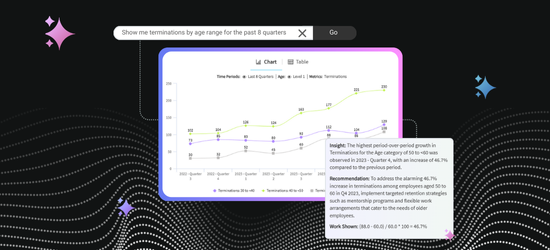

Your Sidekick for Turning People Data into Answers
Most days, working with people data starts with something that sounds simple: a question about what is really going on in your workforce. Simple questions rarely have simple answers, and not every AI tool is built for the nuance, privacy, and context that people analytics requires. You need AI that understands your data, respects your security model, and lives where your people already work. That is where One AI Assistant comes in.
One AI Assistant is your companion for working with data in One Model. Built directly in One Model, it speaks the language of your own people metrics, Storyboards, and custom content. You can ask questions in natural language to build charts, unpack a trend, jump to a relevant Storyboard, answer a quick question, or learn how to do something in the product. The Assistant focuses on turning what you type into something useful, whether that is a visual, a short explanation, or clear next steps.
Instead of hunting through dashboards or wrestling with filters, you can just type what is on your mind:
- “What does our CHRO actually need to know from that wall of charts before the board meeting?”
- “Show me our hires and separations by department for the last 12 months. Include a forecast.”
- “Do we have any storyboards about employee performance and potential?”
One AI Assistant reads your request, finds the right data in One Model, and gives you charts, answers, or explanations in plain language, all inside the platform you already use.

Quick Video Tour
Prefer to watch instead of read? Join Hayley Bresina, One AI Product Manager, for a fast, practical video demo of how One AI Assistant works and what makes it different.
One Assistant, Many Ways to Help
Think of One AI Assistant as one place to start for any people data question. You can begin with something guided and naturally move into deeper exploration as your questions get more complex, tapping into different, powerful capabilities to help along the way without ever breaking your workflow.
Find the Right Storyboard Fast
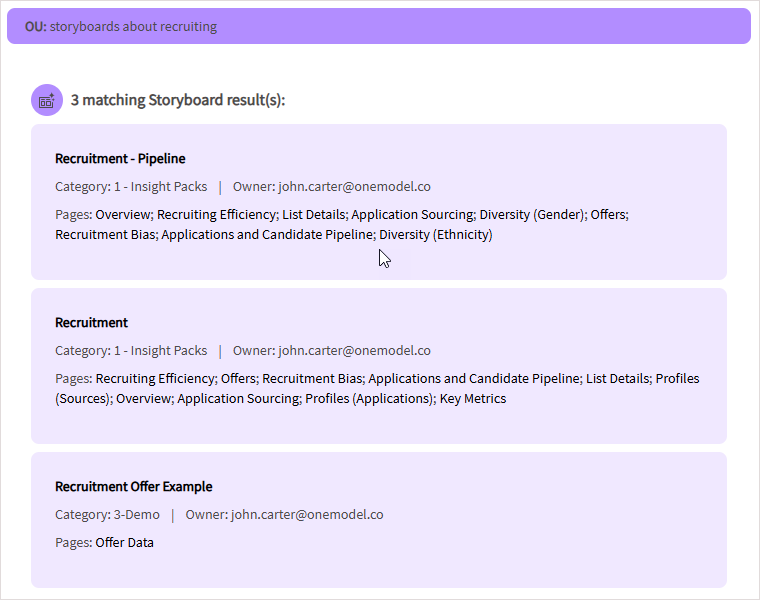
Sometimes the hardest part is just knowing where to click, especially when your people analytics team has already built a ton of great content. With Storyboard navigation, you can ask the Assistant to find “storyboards about recruiting” or “dashboards about performance” and the Assistant brings back the most relevant Storyboards first with simple descriptions. From there, one click opens the one you need, knowing the Assistant is only surfacing Storyboards you are permissioned to see.
Curate Guided, Trusted Answers
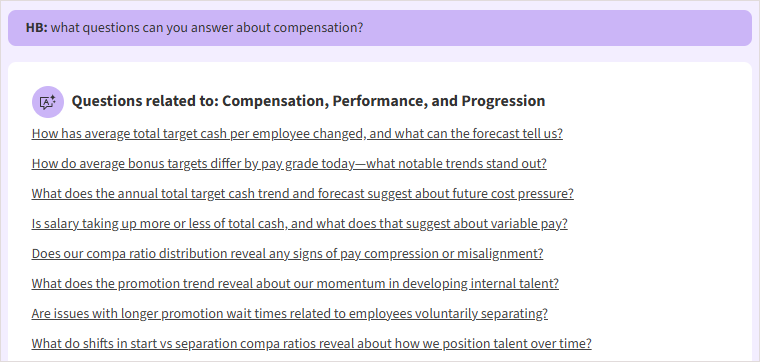
Users don’t always want more dashboards; sometimes they simply need a quick, trusted answer. Answers lets your people analytics team turn frequently asked questions and organization priorities into a guided storyline, so users move through the data in a deliberate, easy to follow order instead of bouncing around a page of charts.
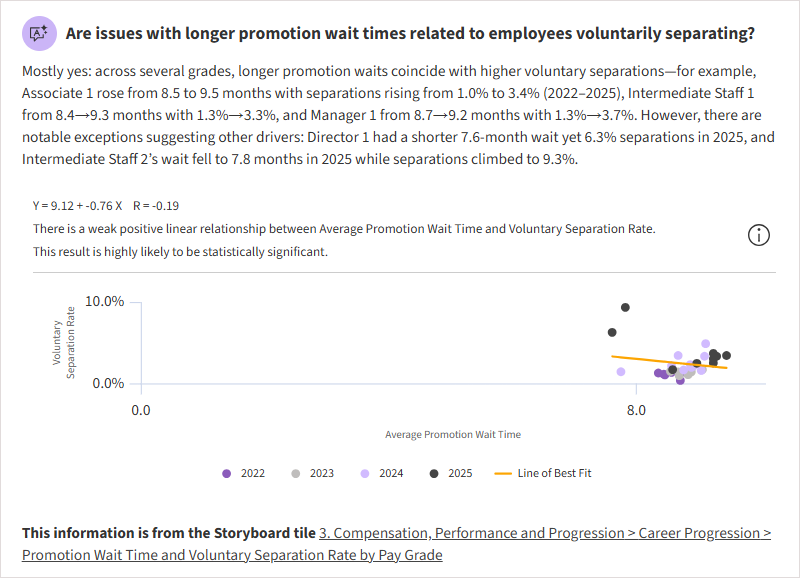
A HRBP can click a question like “Are issues with longer promotion wait times related to employees voluntarily separating?” and get a plain written answer alongside a focused visualization, plus a link to the full Storyboard if they want more detail. Related questions at each step invite them to keep moving through the topic without wondering where to go next. And because each Answer is built from approved visuals and content, occasional or busy users can act on what they see without needing to validate every chart or understand how everything was built behind the scenes.
Build Visualizations on the Fly
New questions pop up all the time, long before anyone has built a Storyboard for them. With One AI Assistant, you can turn those questions straight into charts or tables. Type something like “hires and separations for the last 12 months with a forecast,” and the Assistant creates a visual using the trusted metrics your people analytics team has already set up.
From there you can refine it as much or as little as you like, whether that is adding an annotation or reference line or tweaking colors, then save it to a Storyboard or use it in your next conversation. It turns new ideas into charts quickly, so instead of waiting for new content to be built, you can explore what matters right now.
Let Insights Surface What Matters
When you are staring at a chart and wondering “What is the story here?”, Insights can do the first pass for you. It looks at the data behind your current visualization and pulls out the key trends, outliers, and comparisons, then translates them into short, plain language insight statements with recommendations for the business. If you want to go deeper, you can open “show work” to see how it reached each conclusion, which helps build trust and support data literacy across your users. It is made for those “give me the headline” moments.
Analyze: A Conversation with Your Charts
For freer exploration, Analyze turns your chart or table into a full-blown conversation so you can ask what is happening and why. Ask questions like “Is there any seasonality here?”, “Where are the outliers?”, or “How do the averages compare across groups?”, and the Assistant uses the data from the chart in front of you to answer your questions in plain language. It can also unpack concepts like seasonality or outliers in the context of your workforce, so people are learning as they go, not just staring at numbers. For more advanced users, Analyze can run complex analyses like multivariate forecasts, hot spot polarization analyses for employee listening, and more.
From there you can keep going. Analyze can answer follow up questions like “If I were the head of recruiting, what would I care about in this chart?” or “What other analyses would help me understand this problem more?” and suggest next steps so you are not stuck on the first view. .png?width=968&height=592&name=if%20i%20were%20the%20head%20of%20recruiting%20(Analyze).png)
When you want outside context, you can turn on web search for questions like “How do our separation rates compare to other mid-size tech companies in the US,” so you can understand how you compare to your peers.
.png?width=1064&height=282&name=how%20do%20our%20separation%20rates%20compare%20(Analyze).png)
Chat: Freeform Questions
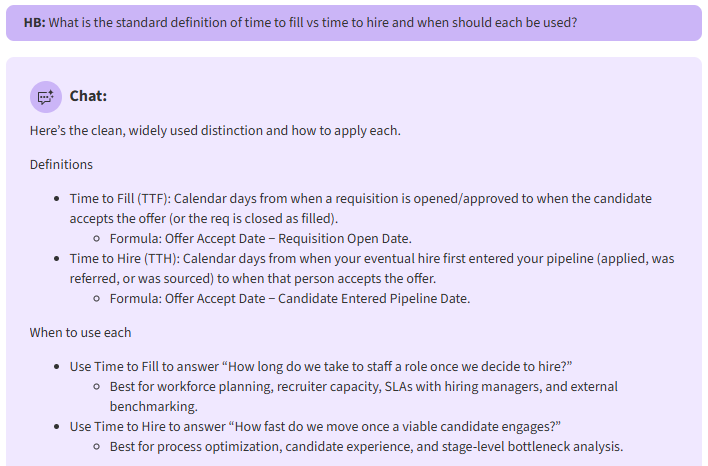
Chat is like having a powerful research assistant inside One Model. Leveraging a reasoning model, it gives users a conversational space for questions that are not tied to a specific chart. You can ask things like “What does SHRM recognize as strong predictors of voluntary separation?” or “What is the standard definition of time to fill vs time to hire and when should each be used?” and get a clear written answer without leaving the platform and breaking your workflow.
Chat: Product Help
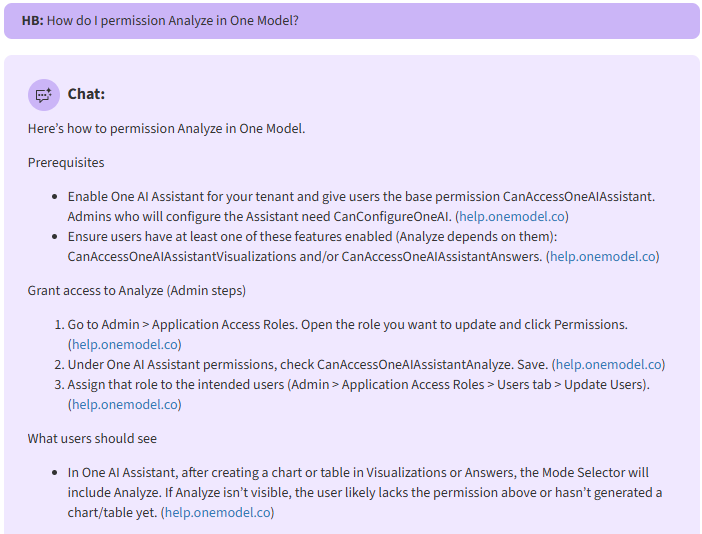
Chat also helps people get things done in One Model without having to sift through the Help Center for the right guide. You can type “How do I create a new metric?” or “How do I give someone access to Analyze?”, and Chat will walk through the steps and link to the right Help Center articles.
See How People Use It
Behind the scenes, One AI Assistant tracks what people are asking, which capabilities they use, and where demand is growing. Analytics teams can see popular questions and topics, understand which storyboards are getting traffic, and spot areas where new Answers, training, or content would help. It also creates a feedback loop for monitoring responsible use.
One AI Assistant in Action:
A Quick Story
Imagine an HR business partner getting ready for a check in with the head of talent acquisition about one thing: “Are employees quitting because they are frustrated with how long it takes to get promoted?”
They start by asking the Assistant to show Storyboards about promotion and mobility and jump into the most relevant one. From there, they click an Answer that asks “Are issues with longer promotion wait times related to employees voluntarily separating?” and get a plain written answer with a focused chart that makes the pattern clear.
They still have questions, so they ask the Assistant to create a view of promotion wait time and voluntary exits by department, then use Analyze to ask things like “Where are the outliers?” and “What should I highlight for the head of talent acquisition?” Finally, they open Chat to double check how to explain their findings in simple terms for leaders.
In a few minutes, they have a clear story, a couple of strong visuals, and language they can use in the meeting, all without hunting through dashboards, writing SQL, or building from scratch.
How One AI Assistant Works Behind the Scenes
Behind that simple experience are a lot of knobs and levers for your admins to shape the experience for your users. They choose which data and content the Assistant can draw from and how open ended or guarded they want the experience to be for different user groups. Because the Assistant sits on top of One Model’s role-based security, it never shows data a user would not normally be allowed to see.
Under the hood, the Assistant combines your modeled people data in One Model with enterprise AI in a way that keeps your data private and under your control. Your information stays your own, is not used to train public models, and is handled under the same security and governance standards as the rest of the platform.
Why One AI Assistant Isn’t Like Other Assistants
Most assistants are something you bolt on for a small group of specialists. You can give the power of One AI Assistant to as many people as you’d like. There are no licenses or user limits to juggle, so if you want every manager, people leader, analyst, or recruiter using it, you simply turn it on for them. Anything your People Analytics team builds becomes available in the Assistant as soon as it is permissioned, so you aren’t limited to our templates or how we think about people analytics. New, organization-specific metrics appear immediately, so people can start asking questions without skipping a beat.
That reach comes with control. One AI Assistant sits on top of the security model you already trust and adds extra knobs and levers for each capability, so you can decide who can use things like Answers, Analyze, and Chat and how open you want each experience to be. You can keep sensitive areas out of scope while still making everyday questions simple to answer. Ethics and governance are part of the design, not a slide at the end. Your data stays your own, is not used to train public models, and is backed by a documented responsible AI approach you can explain to legal, security, and works councils without hand waving.
For the people using it, all of that shows up as confidence, not complexity. New or occasional users get clear, written answers, explanations of concepts like outliers or seasonality in their own context, and safe ways to explore without worrying about “breaking” anything. Power users get a faster way to build and refine visuals, dig deeper into charts, and push their analysis further. And because One AI Assistant is continually evolving with new capabilities and customer feedback, it keeps getting smarter alongside your People Analytics program, instead of becoming yet another tool your teams outgrow.
Wrapping Up
If you want your workforce data to feel less like a maze of charts and more like a conversation with a very sharp, patient colleague, One AI Assistant is ready. Next time you open One Model, try typing the real question in your head into the bar at the top of the screen and see what it tells you.
Ready to see One AI Assistant live?
Let's schedule a demo.
