


 Overview
.svg) One AI
One AI
 Data Mesh
.svg) One AI Assistant
One AI Assistant
 Data Stories
 Enterprise AI
 One AI Data Intelligence


 Employee Engagement
.svg) Talent Retention
Talent Retention
-1.svg) HR Dashboards
HR Dashboards
 Succession Planning
.svg) Talent Acquisition
Talent Acquisition
 Workforce Analytics
 Why One Model
-2.svg) Whitepapers
Whitepapers
 Blog
Blog
-2.svg) Events & Webinars
Events & Webinars
.svg) Product Innovation Blog
Product Innovation Blog
-1.svg) Roles in People Analytics
Roles in People Analytics
.svg)
 Contact Us
-3.svg) Partners
Partners
 About Us
-3.svg) Careers
Careers
-1.svg) News
News

Key Performance Indicators (KPIs) are critical drivers of strategic business execution. They distill what’s happening in your business into a handful of clear, measurable metrics that define success. Yet, for all their importance, simply seeing a number isn't enough, especially for executives and business partners who need to move swiftly from data to action.
We're continually enhancing our data visualization capabilities in Storyboards, and we're excited to introduce the new KPI Chart as a powerful new option. This visualization is designed to deliver not just the critical number, but the strategic insight and recommended action that matters most, transforming passive reporting into active, intelligent guidance.
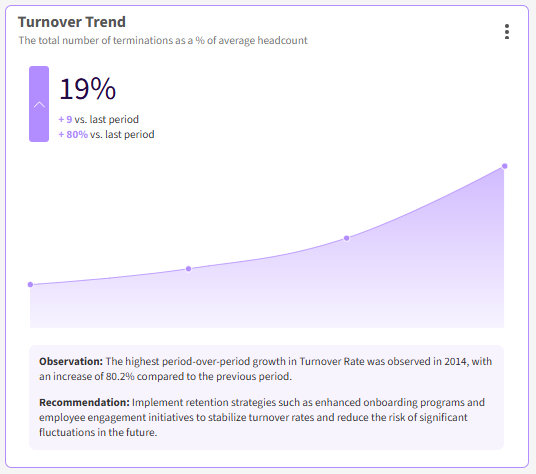
The KPI Chart is specifically designed to highlight key performance indicators, providing a clear and immediate visual representation of metrics, their current status, and performance against previous periods.
Bridge the Gap Between Vision and Strategy
At the C-Suite level, every data point must justify its space on the dashboard. Executive-facing KPIs in People Analytics must directly address financial risk, strategic impact, and organizational change to bridge the gap between the high-level vision of a strategy and the day-to-day actions needed to achieve it.
Traditional reports often force leaders to spend precious time analyzing why a number is up or down. A dedicated KPI Chart, especially one integrated with AI analysis, immediately transforms raw data into actionable intelligence.
By prominently featuring a single, key metric, its variance (the difference in number and percentage) against the last period, and a subtle trend line, the KPI chart helps leaders by:
-
Showing Real-Time Performance: It provides an at-a-glance overview of the primary metric value and its comparison against the last period.
-
Enabling Early Risk Detection: By tracking the difference in performance (the Change Indicator), executives can spot emerging issues, like rapid manager growth or rising turnover, before they become catastrophic problems.
-
Focusing Strategic Alignment: Placing critical KPIs front-and-center ensures the entire leadership team is aligned on the core metrics driving the business strategy.
Write Prompts that Power Insights
What sets the KPI Chart apart is its dedicated area for Custom Insights, which utilizes generative AI to provide a direct, tailored analysis below the visualization. This is how you move beyond simple reporting to becoming a strategic partner to your stakeholders.
The key to unlocking this value is simple: Think like a consultant. Instead of writing a generic and ambiguous prompt, we recommend creating a prompt that directs its analysis and structures its response so the insights are scannable and actionable:
- Define the Persona: Choose the perspective the AI should take. This ensures the analysis is immediately relevant to the viewer.
- For Executives: Act as a Senior People Analytics Consultant to focus on financial risk and strategic impact.
- For HR Business Partners: Act as a HR Business Partner to focus on operational root causes and retention tactics.
- Provide Guidance on Structure: Guide the AI to structure the output so the insight is scannable. We recommend a three-part format with a headline, core insight, and an actionable step.
This quick and easy prompting exercise ensures your leaders receive immediate, customized, and actionable advice every time they view the KPI Chart.
Key Takeaways
The new KPI Chart is a critical tool for strategic decision-making. By combining focused, visually clear data presentation with structured, AI-driven analysis, you can deliver a consultative, high-value perspective that is instantly tailored for every audience, from the CEO to HRBPs.
See One Model in Action
