

 Overview
.svg) One AI
One AI
 Data Mesh
.svg) One AI Assistant
One AI Assistant
 Data Stories
 Enterprise AI
 One AI Data Intelligence


 Employee Engagement
.svg) Talent Retention
Talent Retention
-1.svg) HR Dashboards
HR Dashboards
 Succession Planning
.svg) Talent Acquisition
Talent Acquisition
 Workforce Analytics
 Why One Model
-2.svg) Whitepapers
Whitepapers
 Blog
Blog
-2.svg) Events & Webinars
Events & Webinars
.svg) Product Innovation Blog
Product Innovation Blog
-1.svg) Roles in People Analytics
Roles in People Analytics
.svg)
 Contact Us
-3.svg) Partners
Partners
 About Us
-3.svg) Careers
Careers
-1.svg) News
News

Most organizations know they need their Workday data living alongside the rest of their business data in a cloud warehouse. But if you’ve ever tried to move that data into Snowflake, Azure, Redshift, or BigQuery, you know that what sounds like a simple export often turns into a complex, ongoing engineering project.These setups can work for a while. Then something changes in Workday and the whole thing starts to break. Getting data out of Workday is hard. Keeping it working over time is even harder.
Getting data out of Workday is hard by design
Workday was not built to serve as a reporting database or analytics platform. It is a transactional system designed to run payroll, manage HR and talent processes, and enforce strict security controls. That design makes broad, repeatable data extraction difficult. Teams quickly run into limits when they try to use Workday as a source for analytics rather than operations.
Workday’s object-oriented architecture adds another layer of complexity because it’s not a normal relational database. Data is organized across a large number of interconnected objects, which must be accessed and combined to produce a complete dataset. Extracting meaningful data often requires navigating millions of records across those objects, increasing both processing time and data modeling gymnastics. Because many Workday reports are snapshot-based, teams must also specify a time reference when querying data, which makes building consistent historical views more difficult. This architecture works well for transactional processing, but it introduces friction when data needs to be accessed broadly for reporting and analytics at scale. These constraints are one reason embedded reporting and extracts can feel limited, and why data extraction from Workday is often more complex and slower compared to other HR systems.
Most teams start with standard reports, RaaS (Report as a Service) extracts, or custom report writers. These approaches can work for simple use cases, but they break down when teams need historical data, or combined data across domains. Performance limits, row caps, and security constraints often force teams to split data across multiple reports just to get a partial view.
Others turn to Enterprise Interface Builder (EIB) files or custom extracts. These methods require careful configuration, frequent testing, and constant upkeep. A small change in Workday can cause downstream failures that are difficult to diagnose.
Workday APIs offer more control, but they come with tradeoffs. Schemas are complex, documentation can be hard to interpret, and changes over time require ongoing engineering effort.
For many teams, maintaining these connections becomes a permanent responsibility rather than a one-time project.
Even when data is successfully extracted, it is rarely complete or ready to use. Teams still need to reconcile effective dates, align organizational structures, and apply security rules before the data can support meaningful analysis.
Getting data out of Workday is only the first hurdle. Keeping that data accurate, complete, and dependable over time is where most approaches struggle.
Getting data out is only the first challenge
When teams finally succeed in extracting Workday data, they often expect the hard part to be over. In practice, the real work is just beginning.
Once the data leaves Workday, it often ends up in a mix of spreadsheets, shared folders, and disconnected tools. Some organizations use a cloud warehouse, but many are still working in Excel. Either way, the same workforce data specific challenges show up. Effective dates, organizational changes, and complex security rules shape how HR data must be modeled and interpreted. When those realities are not handled correctly, teams rebuild logic in every spreadsheet, report, and dashboard. That slows analysis, increases the risk of errors, and leaves people unsure which numbers to trust.
Over time, this also creates confusion. Different teams arrive at different answers even though they are working from the same source data. If this sounds familiar, you are not alone. We hear it from HR teams all the time.
- Why is this report different from last month?
- Which version of headcount is correct?
- Why does every request require another workaround?
This is where many Workday to warehouse pipelines fall short. One Model has the only integration built for Workday that uses the larger Workday SOAP API and has been built to overcome the challenges we see with hidden transactions and changes that are not visible/reportable in the API or front-end reporting. We have spent more than a decade fine-tuning this integration.
The SOAP API is the only way to run a large integration at scale and to build a full historical extraction that transitions to accurate daily incremental updates – including retroactive changes – without having to replace the entire data set. The initial extraction can take some time; a couple days for smaller organizations to weeks for larger organizations. The data set is significant (ranging into the Terabytes), Workday is slow, and additional calls are required to get a complete history.
How One Model supports a people data mesh
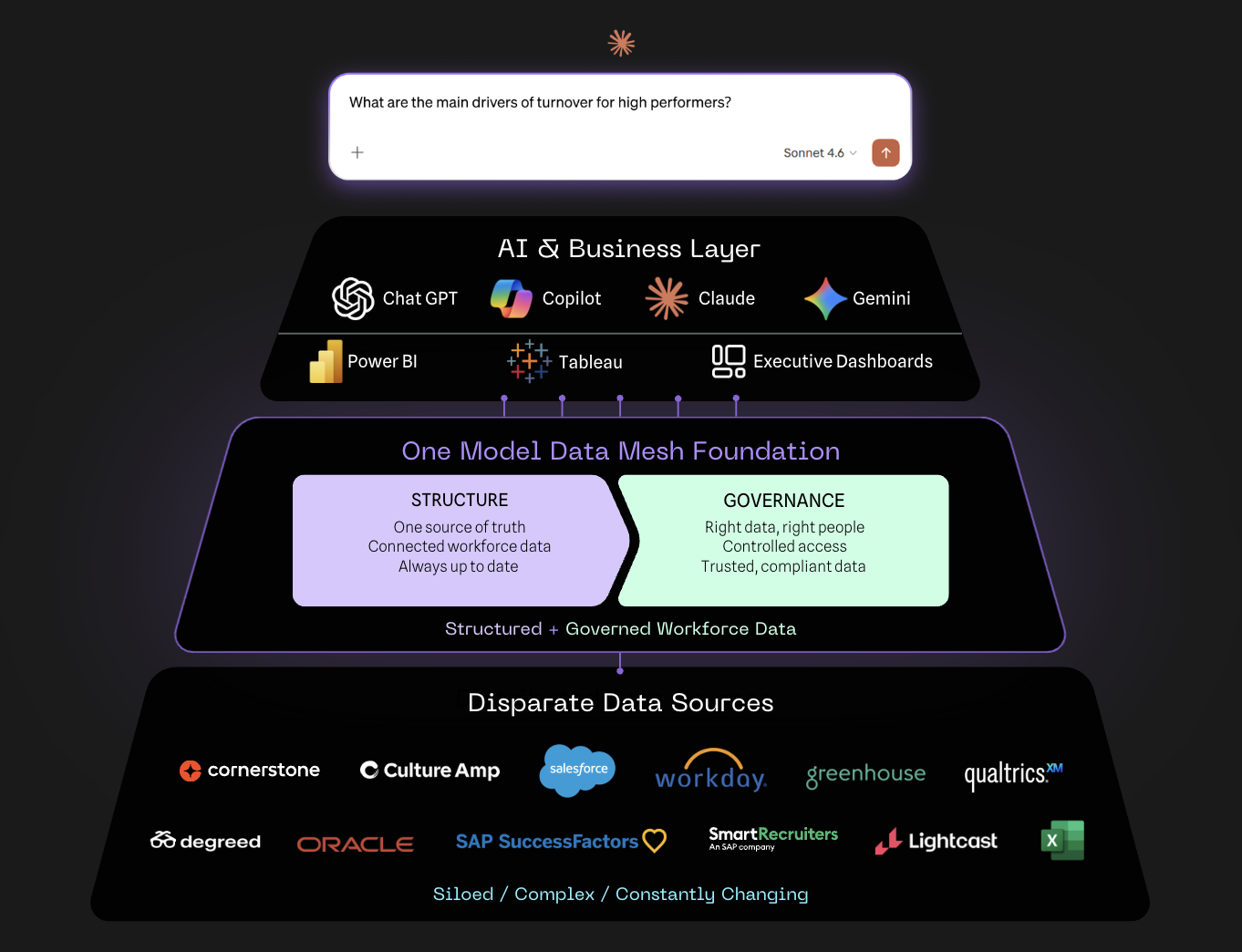
One Model includes intelligent HR connectors, a people-analytics-focused data model, and governed data delivery into your warehouse or BI tools.
What makes One Model different:
- Purpose-built for people analytics: Workforce data follows rules that generic data platforms do not handle well. One Model accounts for effective dating, organizational changes, and row-level security as part of the core model. Teams do not need to recreate those rules in a generic warehouse.
- Faster time to value with less rework: One Model’s people data platform covers extraction, transformation, modeling, and storage. Pre-built HR connectors and a data model tailored to your organization reduce implementation effort and ongoing maintenance.
- Works with Snowflake, Azure, Redshift, and BigQuery: Your cloud warehouse remains your system of record. One Model provides HR-specific structure and governance so teams can analyze workforce data alongside the rest of the business with confidence.
Why this matters now, especially for AI
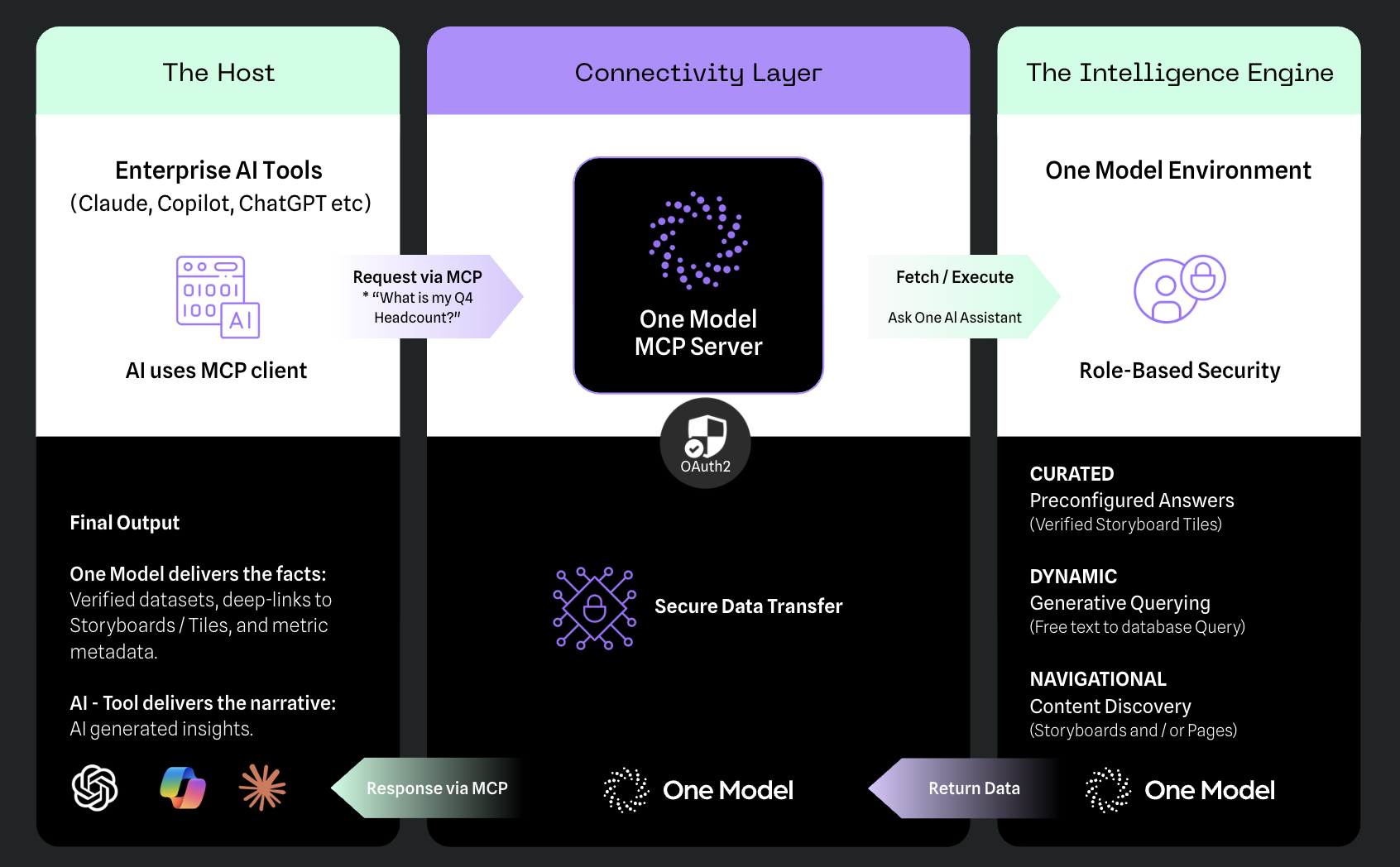
As organizations explore AI-driven analytics, the structure of this data matters more than ever. One Model includes a Model Context Protocol (MCP) server that allows AI agents to query your governed HR data while strictly respecting permissions and definitions. By providing this context, teams avoid unsecured exports and ensure AI answers are grounded in trusted workforce data rather than assumptions or AI hallucinations.
The difference between moving data and using it
Workday data is difficult to extract and easy to get wrong. Moving it into a cloud warehouse is necessary, but it is not sufficient on its own. What separates leading teams from the rest is whether that data becomes a trusted, reusable HR asset or just another dataset people have to work around.
One Model helps organizations make that shift.The result is workforce data that is accessible, reliable, and ready to support better workforce decisions.
Want to dive deeper into Workday? Download the full whitepaper.