


 Overview
.svg) One AI
One AI
 Data Mesh
.svg) One AI Assistant
One AI Assistant
 Data Stories
 Enterprise AI
 One AI Data Intelligence


 Overview
.svg)
 Employee Engagement
.svg) Talent Retention
Talent Retention
-1.svg) HR Dashboards
HR Dashboards
 Succession Planning
.svg) Talent Acquisition
Talent Acquisition
 Workforce Analytics
 Why One Model
-2.svg) Whitepapers
Whitepapers
 Blog
Blog
-2.svg) Events & Webinars
Events & Webinars
.svg) Product Innovation Blog
Product Innovation Blog
-1.svg) Roles in People Analytics
Roles in People Analytics
 Contact Us
-3.svg) Partners
Partners
 About Us
-3.svg) Careers
Careers
-1.svg) News
News

Anyone who owns a monthly report shares a particular kind of dread. Sure, there’s the nail-biting tension behind ‘How did we perform?’ But few appreciate how hard it is just to stitch all those performance stats together. That’s the real trouble.
For our marketing team, one line item turned into a constant pain point: monthly content downloads. Answering it called for another manual pull, another spreadsheet, another afternoon lost to copy-paste.
So we did something that, in hindsight, we should have done ages ago. As a data engineering company, we pointed our own product at the problem. One Model is built for HR analytics, but the engine underneath doesn't care whether the data is headcount or click count. It can ingest and model any form of data in seconds. With that in mind, this is the story of how our marketing team used our own product to stop doing content download reporting by hand. (and how you can too)?
What Made Content Download Reporting So Hard
As a tech company, content is a huge part of how we reach our target market, supplying relevant guides, ebooks , worksheets, and more. Naturally, we want to know how that content performs. But just like headcount, the most basic questions are often the hardest to answer: how many downloads did we get, and how do we break that down by region and attribute by download source? Answering was a monthly pain point.
No Single View of Content Downloads
Much like our customers, we were plagued by the reporting limitations of our software tools–in this case, our marketing suite. Long ago, Hubspot took our ability to consolidate all of our content form date fields into a single report. We were left with multiple reports, one for each download, where we painfully pulled each number into a spreadsheet.
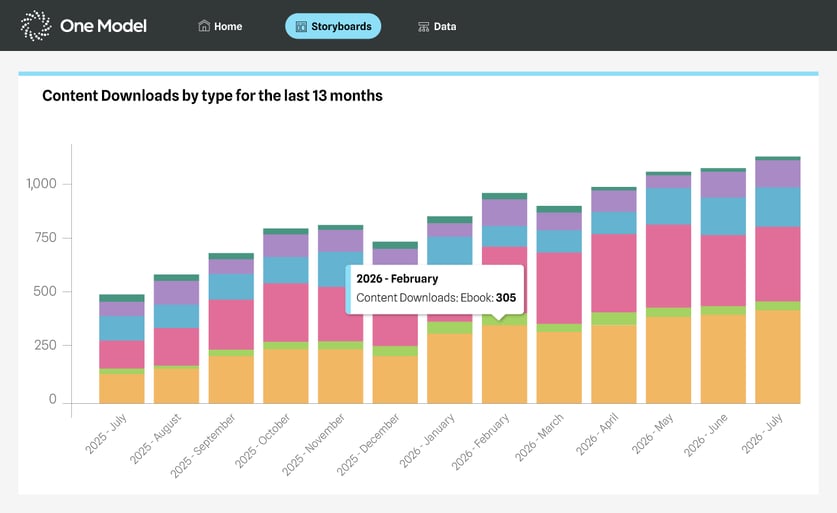
The data lived in HubSpot, so system silos were never the issue. The issue was getting a consolidated view with the ability to break it down. There was no single report that rolled everything up the way we needed it. So every month, someone pulled the numbers by hand, stitched them together, and rebuilt the same view from scratch. It worked, but it was not the best use of our time.
The Fix: HubSpot Data Gets the One Model Treatment
We worked with our own One Model team to bring our HubSpot data into the platform. That was the whole project: connect the source, model the data, and let One Model handle the rest.
Once the data was in, the reporting we used to assemble by hand simply built itself. Every view we were manually pulling now generates automatically, refreshed and ready. No afternoon lost, no spreadsheet to babysit.
Next came the fun part and something we were never able to do before: break the data down by territory, by source, by contact type – you name it.
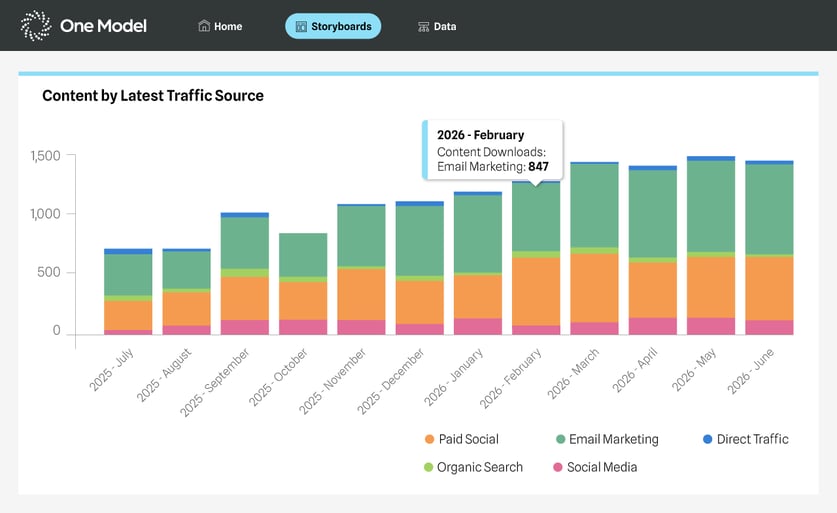
Now, instead of just totals and guesswork, we can dive in and understand drivers. Better yet, we can run AI predictions to better understand what a new content piece may do for us. Using One Model invited a whole new level of sophistication to our content–not just our reporting, but the strategy itself.
The Payoff: The Same Reports, Plus Endless Possibilities We Never Had Time For
Replacing the manual pull was the goal. What we didn't expect was how much further we could go once the data was in One Model.
The breakdowns we always wanted but never had the hours to build were suddenly a few clicks away–slicing downloads by the dimensions that actually inform decisions, instead of settling for the one flat number we had time to produce. We went from "here's the total" to "here's what's driving the total," without adding a single hour of manual work.
When all was said and done, it transformed our content reporting, and hugely elevated our strategy.
If your team is rebuilding the same report every month by hand, that's a strong signal that the work belongs in a system, not a spreadsheet. For us, that system was the one we'd been marketing to customers all along.
One Model is so powerful, it turns all of your data into an AI-ready asset. As One Model evolves beyond HR data, it's exciting to be pioneering the integration of marketing data into the platform.
Curious what One Model could do with your data?
